


When it comes to protecting your home, choosing the right security system can feel overwhelming. With dozens of brands, technologies, and pricing tiers on the market, homeowners often find themselves stuck between ease of use and professional-grade protection. Abode home security has emerged as a compelling option for those who want a customizable, smart-home-integrated system without the hefty price tag or restrictive contracts that plague many competitors. Whether you are a tech enthusiast building a fully automated household or a first-time homeowner simply looking for reliable intrusion detection, Abode offers a flexible ecosystem designed to adapt to your specific needs. In this deep dive, we will explore everything from core features and device compatibility to pricing, setup strategies, and practical tips that will help you get the most out of your Abode system.
What Is Abode Home Security?
Abode is a do-it-yourself home security platform built around a central hub that connects to sensors, cameras, smart locks, and other IoT devices through Wi-Fi, Z-Wave, and Zigbee protocols. Unlike traditional monitored services that lock you into long-term contracts, Abode operates on a subscription-free or low-cost model, giving users the freedom to scale their setup over time. The system is designed for people who value control, transparency, and seamless integration with popular smart home ecosystems like Alexa, Google Home, and Apple HomeKit.
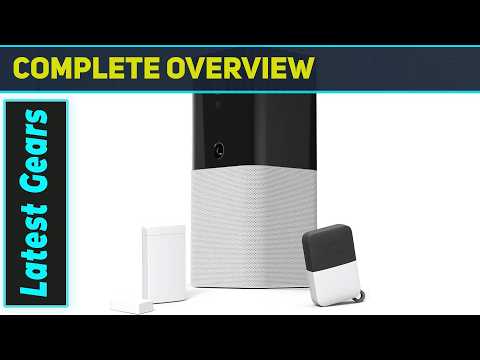
The Abode Iota hub serves as the brain of the operation, handling automation rules, real-time notifications, and device management. It is a compact, Wi-Fi-enabled device that does not require a dedicated Ethernet connection, making placement flexible and straightforward.
How Abode Home Security Works
At its core, Abode relies on a combination of wireless sensors and a central hub to detect and respond to potential threats. When a sensor is triggered — whether it is a door contact, motion detector, or glass break sensor — the hub processes the event and sends instant alerts to your smartphone via the Abode app. You can set custom automation rules, such as turning on lights when motion is detected or arming the system automatically when you leave home.
Abode also supports professional monitoring through UL-listed central stations, but this is entirely optional. You can use the system purely as a local alarm or pair it with monitoring services for 24/7 protection. This modular approach is one of the reasons Abode has gained a loyal following among homeowners who want enterprise-grade capabilities without enterprise-grade complexity.
Key Features of Abode Home Security Systems
Abode stands out in the crowded home security market due to its extensive feature set. Here is a breakdown of the most notable capabilities:
- Custom Automation Rules: Create complex triggers based on time of day, sensor states, and device interactions.
- Geofencing Support: Automatically arm or disarm your system based on your phone’s location.
- Real-Time Alerts: Instant push notifications for every triggered event, customizable by severity level.
- Multiple User Access: Invite family members or trusted contacts to manage the system with role-based permissions.
- Professional Monitoring Optional: Connect to UL-listed monitoring centers without changing your hardware.
- Smart Home Integrations: Works natively with Alexa, Google Assistant, HomeKit, IFTTT, and Matter-compatible devices.
- Remote Arming and Disarming: Control your system from anywhere using the Abode mobile app or web portal.
For beginners, these features might seem like a lot to digest, but Abode’s app interface is designed to walk you through the setup process step by step. Intermediate users will appreciate the depth of automation options, while advanced users can leverage API access and third-party integrations to build truly custom security workflows.
Abode vs. Other Home Security Systems
Choosing the right security system often comes down to a direct comparison with competing platforms. The table below highlights how Abode stacks up against some of the most popular alternatives in the market.
| Feature | Abode | Ring Alarm | SimpliSafe |
| Contract Required | No | No | No |
| Professional Monitoring | Optional | Optional | Optional |
| Smart Home Integrations | Alexa, Google, HomeKit, IFTTT, Matter | Alexa, Google | Alexa, Google |
| Custom Automation Rules | Extensive | Limited | Basic |
| Geofencing | Yes | Yes | Yes |
| Self-Monitoring | Yes, full-featured | Yes | Yes |
| Starting Price | ~$299 for starter kit | ~$199 for starter kit | ~$229 for starter kit |
| Monthly Monitoring Cost | ~$20–$30 | ~$10–$20 | ~$14.99–$24.99 |
As the comparison shows, Abode occupies a unique middle ground. It offers richer automation and broader device compatibility than many competitors while remaining more affordable than fully professional installations. The lack of a required contract is a significant advantage for renters and homeowners who want flexibility.
Setting Up Your Abode System: A Step-by-Step Guide
Beginner Setup Tips
If you are new to home security, the thought of installing a system might feel intimidating. Abode was designed specifically to eliminate that barrier. Here is a simplified approach to getting started:
- Choose Your Starter Kit: Abode offers several kit options, including the Iota, which combines the hub with essential sensors.
- Place the Hub Strategically: Position the Iota hub in a central location in your home to maximize wireless range for all connected sensors.
- Download the Abode App: Available for both iOS and Android, the app guides you through initial pairing and setup.
- Add Core Sensors: Start with door/window contacts for entry points and a motion detector for high-traffic areas like hallways and living rooms.
- Create Your Automation Rules: Even basic rules, such as arming the system when you leave, add significant value immediately.
- Test Everything: Trigger each sensor manually and verify that alerts reach your phone promptly.
Most users can have a fully functional basic setup up and running within an hour. The wireless sensors use peel-and-stick mounting, so there is no drilling or complicated wiring involved.
Advanced Configuration and Optimization
Once you have the basics in place, you can unlock the full potential of your Abode system through advanced configurations. Power users often explore features like nested automation rules, conditional triggers based on multiple sensor states, and scheduled device routines. For example, you can create a rule that turns on smart lights, locks all doors, and activates the security mode when your phone leaves the geofence area after sunset.
Integrating Abode with IFTTT (If This Then That) opens up even more possibilities. You can connect Abode to weather services, calendar events, or third-party smart home devices that do not have native Abode support. This level of customization is rare in the DIY security space and is a major reason why Abode appeals to technically inclined users.
Abode Compatible Devices and Integrations
One of the strongest selling points of Abode is its extensive device compatibility. The system supports a wide range of Z-Wave, Zigbee, and Wi-Fi devices, giving you the freedom to mix and match hardware from different manufacturers. Popular compatible devices include
- Outdoor and indoor security cameras from multiple brands
- Smart locks including August, Schlage, and Yale models
- Smoke and carbon monoxide detectors
- Water leak sensors for basement and appliance areas
- Smart sirens and strobe lights for audible and visual deterrents
- Garage door controllers and smart outlets for appliance monitoring
Because Abode supports Matter-compatible devices, the ecosystem is future-proofed as the smart home industry moves toward standardized protocols. This means you are not locked into a single brand’s hardware ecosystem, which is a significant advantage for long-term scalability.
Pricing and Plans: Is Abode Worth It?
Abode’s pricing structure is refreshingly straightforward. The starter kits are competitively priced, typically ranging from $299 to $399 depending on the configuration. There is no monthly fee required if you choose to use the system without professional monitoring, making it an excellent option for budget-conscious homeowners who still want a robust security platform.

If you opt for professional monitoring, Abode offers plans starting at approximately $20 per month, which is on par with or lower than most major competitors. Monitoring plans include features like emergency dispatch, cellular backup communication, and priority customer support.
Is Abode worth the investment? For homeowners who value customization, smart home integration, and freedom from contracts, the answer is overwhelmingly yes. The system scales beautifully from a single-room setup to a whole-home deployment with dozens of sensors and automations.
Expert Tips for Maximizing Your Abode Home Security
To get the best results from your Abode system, consider these expert recommendations:
- Layer Your Sensors: Do not rely on a single type of detection. Combine door contacts, motion sensors, and glass break detectors for comprehensive coverage of each entry point.
- Use Geofencing Wisely: Adjust the geofence radius to prevent accidental arming or disarming when you are in your backyard or running quick errands nearby.
- Keep Firmware Updated: Abode regularly releases firmware updates that improve performance and patch security vulnerabilities. Enable automatic updates in the app settings.
- Position Cameras Strategically: Place cameras at entry points and blind spots, but avoid aiming them at areas that capture unnecessary street activity, as this can create alert fatigue.
- Set Up User Roles: If multiple family members manage the system, assign appropriate permissions to prevent accidental arming or disarming.
- Test Monthly: Run a full system test every month to ensure all sensors, sirens, and notification channels are functioning correctly.
Frequently Asked Questions (FAQs)
Can I Use Abode Without a Subscription or Monitoring Plan?
Absolutely. Abode’s core functionality, including local alarm triggers, smartphone notifications, and automation rules, is available without any monthly fee. Professional monitoring is entirely optional and can be added or removed at any time.
What Makes Abode Home Security Different from Ring or SimpliSafe?
Abode differentiates itself through superior automation capabilities, broader smart home compatibility (including HomeKit and Matter), and a more open ecosystem that supports third-party integrations via IFTTT and APIs. It is designed for users who want deep customization rather than a one-size-fits-all experience.
Is Abode Suitable for Renters?
Yes, Abode is an excellent choice for renters. The wireless sensors use peel-and-stick installation, requiring no drilling or permanent modifications. The system is portable and can be easily uninstalled and relocated when you move.
How Reliable Is Abode’s Cellular Backup for Monitoring?
Abode’s cellular backup uses a dedicated SIM card in the Iota hub, ensuring that your system remains connected and operational even if your home Wi-Fi goes down. This feature is included in monitoring plans and provides an additional layer of reliability for intrusion detection and emergency alerts.
Can I Add Abode Devices to My Existing Smart Home Setup?
Yes. Abode integrates natively with Alexa, Google Home, Apple HomeKit, and IFTTT, making it straightforward to add Abode sensors and automations into an existing smart home ecosystem. You can control Abode devices using voice commands or create cross-platform automation routines.
Conclusion
Abode home security delivers a rare combination of flexibility, power, and affordability that appeals to a wide range of users. From first-time homeowners setting up their first system to experienced smart home enthusiasts building complex automation networks, Abode provides the tools and openness to create a security setup that truly fits your lifestyle. With no contracts, optional professional monitoring, extensive device compatibility, and a focus on user control, Abode represents one of the most well-rounded DIY home security platforms available today. If you are ready to take control of your home’s safety without compromising on convenience or customization, Abode is a platform worth serious consideration.